
3D Product Rendering: Process, Benefits, Applications, and Professional Standards
A product may need to be evaluated, approved, marketed, or sold long before the first production unit is available for photography. 3D product rendering addresses this challenge by converting drawings, CAD files, sketches, specifications, and material references into polished digital images or animations.
Unlike a basic computer-generated image, professional product visualization must communicate form, scale, materials, manufacturing logic, function, and brand positioning. A technically accurate model may still produce an ineffective image if the camera angle, lighting, composition, surface behavior, or visual hierarchy is poorly resolved.
For manufacturers, product designers, furniture companies, building-product suppliers, industrial clients, marketing teams, architects, and developers, 3D product rendering can support several stages of the product lifecycle—from design evaluation and investor presentations to catalogs, websites, installation guides, trade-show materials, and digital advertising.
As part of its broader visualization and digital communication services, RENDEREXPO approaches product visualization as more than image production. The objective is to create clear, credible, presentation-ready visual assets that help clients explain what a product is, how it works, where it belongs, and why it has value.

What Is 3D Product Rendering?
3D product rendering is the process of generating two-dimensional images or animations from a digital three-dimensional model of a product.
The workflow typically combines:
Product geometry
Dimensions and proportions
Surface materials
Colors and finishes
Lighting conditions
Camera positions
Backgrounds or environments
Rendering and post-production settings
Rendering software processes this information to calculate the appearance of the object, including its shadows, highlights, reflections, transparency, texture, depth, and relationship to the surrounding environment. Autodesk describes rendering as the stage in which information from 3D models, textures, lighting, cameras, and other inputs is processed into images or animations.
A product rendering can represent an existing object, a proposed design, a product still in engineering development, or an entire family of related products. It may be highly photorealistic, intentionally diagrammatic, technically descriptive, or stylized for a particular marketing campaign.
The final output may include a single image, a collection of consistent catalog views, an animated assembly sequence, an exploded technical view, a 360-degree rotation, or an optimized 3D model for an interactive web or augmented-reality experience.
Why Companies Use 3D Product Rendering
Professional product rendering gives companies more control over how products are evaluated and presented.
Traditional product photography remains valuable, but it requires a physical product, studio coordination, shipping, staging, equipment, and potentially multiple rounds of reshooting. Product visualization can begin while a product is still being designed, allowing marketing and presentation materials to advance in parallel with engineering and manufacturing.
Visualize Products Before Manufacturing
One of the most important advantages of 3D product rendering is the ability to represent a product before a physical prototype or production unit exists.
A company can use CAD files, engineering drawings, sketches, or reference images to develop visuals for:
Internal design reviews
Investor presentations
Dealer or distributor meetings
Prelaunch advertising
Product approval packages
Trade-show presentations
Packaging studies
Early sales discussions
This can help teams identify how the product will be perceived before substantial resources are committed to photography, fabrication, packaging, or campaign production.
Create Consistent Product Families
Photography can become difficult to standardize when dozens or hundreds of products must be presented under identical lighting and camera conditions.
A controlled digital scene allows every product to share the same:
Camera height
Focal length
Background
Shadow direction
Lighting intensity
Image dimensions
Brand presentation
This is especially useful for product catalogs, furniture collections, building-material families, equipment lines, finish options, and e-commerce listings.
Produce Variations Efficiently
Once an accurate 3D model and material system have been developed, the same product can be rendered in multiple colors, finishes, configurations, sizes, and environments.
For example, a manufacturer might need to show one fixture in:
Brushed stainless steel
Matte black
Polished brass
Powder-coated white
Custom corporate colors
Instead of manufacturing and photographing each variation, the visualization team can update the digital material definitions and maintain the same composition across the full collection.
Explain Features That Photography Cannot Show
Some product characteristics are difficult or impossible to communicate through conventional photography.
3D visualization can isolate components, remove exterior panels, create transparent sections, separate assemblies, or display internal systems. These capabilities are particularly valuable for industrial equipment, mechanical products, building systems, technical fixtures, data center equipment, and complex manufactured assemblies.
Reuse the Digital Asset
A well-developed 3D product model can become the foundation for multiple deliverables rather than a one-time image.
The same digital asset may support:
High-resolution still renderings
Product animation
Exploded views
Assembly diagrams
Interactive web viewers
Augmented-reality experiences
Virtual showrooms
Configurators
Sales presentations
Installation communication
Formats such as glTF are designed for the efficient transmission and loading of 3D scenes and models across compatible applications, making optimized 3D assets useful beyond traditional still imagery.
3D Product Rendering vs. Product Photography
Product rendering and photography should not automatically be treated as competing methods. Each is appropriate for different project conditions.
Consideration | 3D Product Rendering | Product Photography |
Physical product required | No | Yes |
Can begin before manufacturing | Yes | Usually no |
Finish and color variations | Efficient after setup | May require separate samples |
Internal or exploded views | Highly flexible | Limited or impractical |
Environmental control | Fully controlled | Dependent on studio and location |
Physical authenticity | Digitally simulated | Directly captured |
Changes after production | Model or scene can be revised | May require reshooting |
Animation and interactivity | Built from the same 3D asset | Requires additional production |
Large product logistics | No physical transport required | May require shipping and staging |
Initial asset preparation | Modeling and material development | Product and studio preparation |
Photography may be preferable when the exact condition, imperfection, texture, or handmade character of a finished physical object must be documented. Rendering may be more effective when the product does not yet exist, has many variations, requires technical explanation, or must appear consistently across a large visual campaign.
Many sophisticated product-marketing programs use both methods. Photography can document the physical product, while rendering can expand the campaign through alternate configurations, conceptual environments, animation, and technically impossible views.
Major Types of 3D Product Rendering
The appropriate rendering style depends on the product, audience, communication goal, and distribution channel.
Studio Product Renderings
Studio renderings place the product against a controlled background, often white, gray, black, or a subtle gradient.
These images are commonly used for:
E-commerce product pages
Manufacturer websites
Digital catalogs
Specification sheets
Packaging
Sales presentations
Online marketplaces
The apparent simplicity of a studio rendering makes precision especially important. Poor edge definition, inaccurate proportions, unrealistic contact shadows, excessive reflections, or incorrect material behavior are immediately noticeable when there is no environmental context to distract the viewer.
Lifestyle Product Renderings
Lifestyle renderings position the product within a designed environment that communicates its intended use.
A furniture manufacturer may show a chair within a workplace, hospitality, residential, or educational interior. A lighting company may demonstrate how a fixture affects a room. A building-product manufacturer may show façade panels, flooring, hardware, or millwork within an architectural setting.
RENDEREXPO’s experience with interior rendering and broader architectural visualization, CGI, and animation is particularly relevant when the product cannot be evaluated independently from the space around it.
A successful lifestyle rendering should communicate the product clearly without allowing the environment to overpower it. The context supports the product story; it should not compete with it.
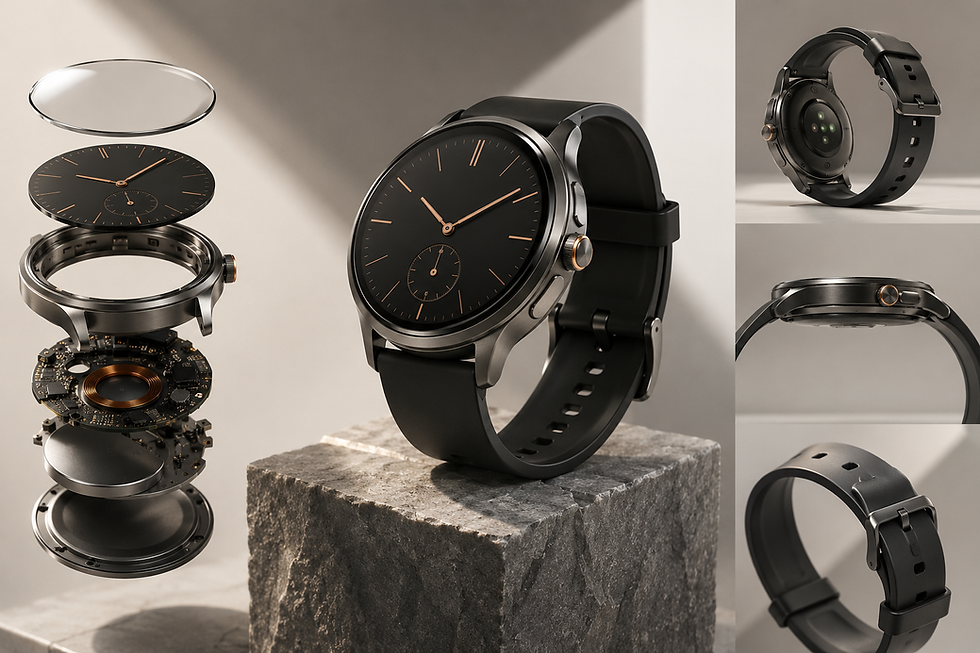
Exploded Product Renderings
Exploded views separate the components of a product while preserving their spatial relationship.
They can explain:
Assembly order
Product construction
Replaceable components
Internal systems
Fastener locations
Layered materials
Maintenance access
Packaging arrangements
Exploded views are valuable for product manuals, technical presentations, sales training, installation communication, investor materials, and industrial marketing.
Cutaway and Sectional Renderings
Cutaway renderings remove or make part of the exterior transparent to reveal internal features.
They are often used for:
Mechanical equipment
Building-envelope products
HVAC components
Electrical assemblies
Data center infrastructure
Plumbing fixtures
Insulated products
Prefabricated systems
Storage and filtration equipment
These visuals require more than attractive lighting. The visualization team must understand which components need to remain visible, how the section should be organized, and what information the viewer is expected to understand.
Product Animation
A product animation communicates movement, transformation, assembly, or functionality over time.
Animations can show:
How a product opens or folds
How parts connect
How a mechanism operates
How a product is installed
How fluids, air, or materials move
How users interact with the product
How multiple configurations differ
How a modular system expands
Animation is particularly useful when the product’s value cannot be explained by a static image. It can also provide a central visual asset from which shorter clips, still frames, social content, and presentation sequences are extracted.
RENDEREXPO’s visualization capabilities include motion-based communication within its broader CGI and animation services.
360-Degree and Interactive Product Visualization
A 360-degree product presentation allows the viewer to rotate an item and examine it from multiple directions.
More advanced interactive models may allow users to:
Zoom into details
Change finishes
Select configurations
Hide components
Activate animations
View dimensions
Place the product in augmented reality
Google’s Scene Viewer, for example, allows compatible mobile users to interact with web-hosted 3D models in either a 3D viewer or an augmented-reality environment.
Google has also added support for connecting 3D models with specific products through structured data, demonstrating the growing relationship between product information, search visibility, and interactive 3D content.
Interactive deployment should be considered early because a high-resolution production model is not automatically optimized for real-time use. Geometry, textures, file size, material complexity, and export formats may need to be adjusted for web or mobile performance.
The Professional 3D Product Rendering Process
A disciplined workflow improves visual quality, reduces revisions, and protects the accuracy of the final presentation.
1. Define the Communication Objective
The process should begin with the intended use of the rendering, not with software.
Important questions include:
Who will view the image?
What decision should it support?
Is the goal technical explanation, marketing, sales, or approval?
Will it be used online, in print, in animation, or interactively?
Which product features must be emphasized?
How close will the viewer see the product?
Does the product need environmental context?
A hero image for a marketing campaign requires a different visual strategy than an exploded diagram for a technical manual.
2. Collect Product Information
The visualization team may receive:
CAD or BIM files
STEP, IGES, OBJ, FBX, STL, or similar 3D files
Dimensioned drawings
Product sketches
Photographs
Material samples
Finish schedules
Brand guidelines
Assembly instructions
Packaging references
Competitor or mood references
The completeness of the information directly affects the level of accuracy that can be achieved.
Missing dimensions, unresolved components, generic materials, and inconsistent references should be identified before detailed rendering begins.
3. Build or Prepare the 3D Model
When a usable model already exists, it may still require substantial preparation.
Engineering and manufacturing models are often created for fabrication rather than visualization. They may include excessive internal geometry, overlapping surfaces, unorganized assemblies, unsupported materials, sharp edges, or unnecessarily dense components.
The visualization model must be cleaned, organized, and optimized while preserving the features that affect the final image.
When no model exists, the product can be modeled from drawings, sketches, photographs, and dimensions.
4. Develop Accurate Materials
Material development is one of the most important stages of photorealistic product rendering.
A surface should not merely have the correct color. It must also respond convincingly to light.
Relevant properties may include:
Roughness
Reflectivity
Transparency
Refraction
Metallic behavior
Surface texture
Anisotropy
Subsurface characteristics
Coating depth
Imperfections
Manufacturing finish
Physically based rendering systems use coordinated material parameters to produce more consistent behavior between real-time and ray-traced visualization methods.
Material references should be as specific as possible. “Metal,” “plastic,” and “wood” are not sufficient descriptions for high-end visualization. Brushed aluminum, polished stainless steel, molded ABS, powder-coated steel, clear acrylic, walnut veneer, and honed stone all react differently under identical lighting.
5. Establish Cameras and Composition
A technically correct product can still be presented poorly.
The camera must explain the object clearly while supporting its desired brand character. Decisions include:
Viewing angle
Camera height
Lens length
Perspective compression
Cropping
Negative space
Orientation
Visual hierarchy
Relationship to text or layout
An engineering audience may need a direct, descriptive view. A luxury campaign may benefit from controlled cropping, restrained lighting, and carefully managed reflections. An e-commerce page may require standardized front, side, rear, and detail views.
6. Design the Lighting
Lighting reveals the product’s geometry, material quality, scale, and surface behavior.
Common approaches include:
Neutral studio lighting
High-key commercial lighting
Dark dramatic lighting
Soft daylight
Directional technical lighting
Environmental lighting
Hybrid studio-environment setups
Strong product lighting is deliberate. Highlights should describe edges and curvature, reflections should reveal materials without obscuring the form, and shadows should anchor the object without becoming visually heavy.
7. Produce Draft Renderings
Drafts allow the team to review the main visual decisions before full-resolution production.
Reviews should address:
Product geometry
Proportions
Materials and finishes
Camera angle
Lighting
Background
Branding
Required accessories
Product configuration
Technical accuracy
Corrections to geometry or camera direction are more efficient during draft stages than after final rendering and post-production.
8. Complete Quality Control
A final quality-control review should examine both visual execution and product accuracy.
The review may include:
Alignment with drawings
Correct component configuration
Accurate labels and branding
Consistent materials
Proper edge treatment
Realistic shadows and reflections
Resolution and cropping
Color consistency
File naming
Required output formats
For product lines, quality control must also verify that every image follows the same visual system.
9. Deliver Channel-Specific Outputs
One master file should not be assumed to work everywhere.
Deliverables may need to be adjusted for:
E-commerce thumbnails
Product-detail pages
Social-media ratios
Large-format print
Sales presentations
Transparent-background PNG files
Advertising banners
Video platforms
Interactive web viewers
Augmented-reality applications
Resolution, cropping, file size, background transparency, color profile, and compression should match the intended use.
What Information Is Needed for a Product Rendering Project?
The ideal information package includes an accurate 3D or CAD model, dimensions, material references, colors, product photographs, branding files, and examples of the desired visual direction.
However, a project may still proceed without every item.
The minimum requirements depend on the expected accuracy. A conceptual rendering can often be created from sketches and reference images. A technically precise manufacturing or installation visual will require more complete documentation.
Clients should also identify:
The number of products
Required views per product
Number of finish variations
Final image dimensions
Required backgrounds
Desired environments
Animation requirements
Interactive or AR requirements
Target delivery formats
Review and approval participants
Clear inputs reduce uncertainty and help the visualization team establish an efficient production strategy.
Industries That Use 3D Product Rendering
Furniture and Interior Products
Furniture manufacturers, interior designers, millwork companies, lighting brands, and fixture suppliers can use product renderings to show individual products as well as complete collections.
Products can also be inserted into realistic interiors to demonstrate scale, finish coordination, application, and brand character.
Related visualization may include 3D floor plans or full interior environments when the relationship between the product and the surrounding space is commercially important.
Building Products and Architectural Materials
Building-product manufacturers often need to show products within realistic architectural conditions.
Examples include:
Façade systems
Windows and doors
Roofing products
Wall panels
Flooring
Lighting
Railings
Hardware
Plumbing fixtures
Modular systems
Site furnishings
Prefabricated components
RENDEREXPO’s exterior rendering services can provide contextual building environments, while aerial rendering may be appropriate for site-scale products, modular communities, infrastructure systems, or large outdoor equipment.
Industrial and Technical Equipment
Industrial product rendering can communicate equipment that is too large, expensive, inaccessible, unfinished, or technically complex for conventional photography.
Applications may include:
Machinery
Control systems
Manufacturing equipment
Energy infrastructure
Enclosures
Technical assemblies
Modular facilities
Process equipment
Large mechanical components
For complex systems, the work may overlap with digital construction and digital twin services, particularly when product geometry must be connected to installation sequencing, BIM communication, asset information, or operational planning.
Data Center Products and Infrastructure
Data center equipment frequently requires technical visualization because the relevant relationships are spatial, layered, and difficult to photograph clearly.
Potential subjects include:
Equipment racks
Cooling systems
Generator enclosures
Electrical equipment
Modular data center units
Cable-management systems
Containment systems
Power-distribution components
Prefabricated MEP assemblies
Product-focused imagery may be combined with broader data center development support and visualization to explain how specific equipment relates to the building, campus, utility network, construction sequence, or operational environment.
Consumer Products and E-Commerce
Consumer-product companies use 3D rendering for digital storefronts, online advertising, packaging, product launches, marketplaces, and interactive shopping experiences.
Consistency is especially important in e-commerce. Images must often align across a large inventory while remaining clear at thumbnail scale and detailed enough for product pages.
Real Estate, Hospitality, and Branded Environments
Some products derive much of their value from how they contribute to a larger environment.
Custom furniture, branded fixtures, kiosks, modular displays, hospitality elements, amenity products, and specialty installations may need to be presented within a complete architectural scene.
Clients can review examples of broader visual execution in the RENDEREXPO portfolio and design case studies.
What Determines the Cost of 3D Product Rendering?
There is no responsible universal price for product rendering because the effort depends on the scope and condition of the source material.
Major cost factors include:
Model Availability
A clean, organized model reduces production work. A model that must be created from photographs or drawings requires additional time.
Product Complexity
A simple container is different from a machine containing hundreds of parts, transparent surfaces, wiring, fasteners, and internal systems.
Material Complexity
Basic matte materials are typically easier to develop than transparent plastics, layered coatings, brushed metals, iridescent finishes, fabrics, liquids, or translucent materials.
Number of Views
One hero image requires less production than a complete image package with front, side, detail, lifestyle, exploded, and alternate-finish views.
Number of Variations
Color and material variations may be efficient once the base asset is complete, but each variation still requires setup, rendering, review, file management, and quality control.
Environment Requirements
A simple studio background requires less development than a fully designed interior, exterior location, industrial facility, or custom-branded environment.
Animation and Interactivity
Motion, assembly sequences, simulation, 360-degree presentation, configurators, web optimization, and AR deployment introduce additional technical requirements.
Resolution and Final Use
Large-format advertising, close-up print materials, and cinematic animation generally require greater detail than small website thumbnails.
A professional proposal should define the inputs, assumptions, deliverables, number of review stages, file formats, and exclusions rather than relying on a generic price per image.
How to Choose a 3D Product Rendering Company
The strongest provider is not necessarily the studio with the most dramatic portfolio. The right partner must understand the product, the audience, and the business purpose of the visuals.
Evaluate the following criteria.
Modeling Accuracy
Can the team interpret CAD files, drawings, dimensions, assemblies, and manufacturer references correctly?
Material Quality
Do metals, glass, plastics, fabrics, coatings, and finishes behave convincingly under different lighting conditions?
Composition and Art Direction
Can the studio create more than a technically correct image? Does it understand product hierarchy, camera selection, negative space, branding, and campaign consistency?
Technical Communication
Can the team produce exploded views, cutaways, installation sequences, or system diagrams when the product requires explanation?
Environmental Visualization
Can the provider place the product within a credible architectural, industrial, commercial, or landscape context?
Quality-Control Process
Are drafts reviewed systematically for geometry, materials, product configuration, labels, dimensions, and final output requirements?
Scalable Deliverables
Can the product model support still images, animation, finish variations, presentations, and interactive uses without rebuilding the asset for every request?
Understanding of the Built Environment
For furniture, building products, equipment, infrastructure, and manufactured architectural systems, spatial and construction knowledge is valuable. The product must not only appear polished; it must be shown at a credible scale and in a plausible installation condition.
How RENDEREXPO Approaches 3D Product Rendering
RENDEREXPO is a Washington, DC-area visual intelligence studio working across architectural visualization, CGI, digital construction, data centers, spatial mapping, and complex project communication. Its work is grounded in architectural judgment, technical understanding, visual direction, and presentation strategy.
For product-oriented visualization, this broader perspective matters.
A product is rarely viewed in isolation. It may need to be understood as part of an interior, façade, industrial process, construction sequence, data center system, campus, or operational environment.
RENDEREXPO can structure the visual approach around the client’s actual objective:
Presenting an unbuilt product
Explaining a technical assembly
Showing material variations
Developing catalog imagery
Creating contextual lifestyle renderings
Producing installation or sequencing visuals
Building animation assets
Preparing investor or stakeholder presentations
Connecting the product to a larger architectural or technical system
The company’s architectural visualization services support polished still imagery and animation, while its digital construction capabilities can support more technical communication involving assemblies, phases, coordination, or installation logic.
Where products interact with buildings, sites, infrastructure, or assets, RENDEREXPO can also draw from its experience in indoor and outdoor GIS mapping systems and broader spatial-data communication.
Additional information about the studio’s design-led and architecturally grounded approach is available on the About RENDEREXPO page. More articles covering 3D modeling, rendering, visualization, construction, and project communication can be found in the RENDEREXPO blog.
Frequently Asked Questions About 3D Product Rendering
What is 3D product rendering?
3D product rendering is the process of creating digital images or animations from a three-dimensional product model. The model is assigned materials, lighting, cameras, and environmental settings to produce realistic or technically descriptive visuals.
Can a product be rendered before it is manufactured?
Yes. Products can be rendered from CAD files, drawings, sketches, dimensions, photographs, or design references before a physical prototype is available. This allows marketing, approvals, and presentations to begin earlier.
What files are needed for 3D product rendering?
Useful files include STEP, IGES, OBJ, FBX, STL, CAD drawings, dimensioned PDFs, product photographs, material specifications, finish references, and brand guidelines. The exact requirements depend on the desired accuracy.
Is 3D product rendering better than photography?
Neither method is universally better. Rendering is advantageous for unbuilt products, variations, technical views, animation, and controlled consistency. Photography is valuable when the exact physical condition of a completed object must be documented.
How long does a product rendering take?
The schedule depends on model availability, product complexity, materials, number of images, environmental requirements, revisions, and final resolution. A complete product family or animation generally requires more time than a single studio image.
Can one 3D model be used for multiple product colors?
Yes. Once the product geometry and base materials are prepared, multiple colors and finish combinations can often be generated from the same digital asset while maintaining consistent cameras and lighting.
Can product renderings be used for augmented reality?
Yes, provided the model is prepared and optimized for the target platform. Real-time and AR models usually require reduced geometry, optimized textures, supported materials, and an appropriate format such as glTF or GLB.
Conclusion: 3D Product Rendering as a Long-Term Visual Asset
3D product rendering gives companies a controlled way to evaluate, explain, market, and distribute product information before or after manufacturing.
Its value extends beyond producing a polished image. An accurate product model can support design reviews, finish studies, sales materials, e-commerce listings, technical diagrams, installation communication, animations, interactive experiences, and future marketing campaigns.
The strongest results come from combining technical accuracy with deliberate visual direction. Geometry, materials, lighting, camera selection, context, and output requirements must all support the same communication objective.
RENDEREXPO helps manufacturers, product designers, architects, building-product suppliers, industrial clients, developers, and marketing teams create product visuals that are credible, refined, and aligned with how the product will actually be evaluated or used.
To discuss a product-rendering package, animation, contextual visualization, or broader project-communication requirement, contact RENDEREXPO and share your available CAD files, drawings, references, and intended deliverables.


Comments