
How to Relocate Data Center Operations Without Losing Control
Relocating a data center is one of the most sensitive projects an organization can undertake. Unlike a standard office move, a data center relocation affects mission-critical infrastructure, IT continuity, power systems, cooling capacity, security, network performance, compliance, operations, and business risk. A poorly planned move can create downtime, cost overruns, equipment damage, operational confusion, and stakeholder pressure.
To successfully relocate data center operations, organizations need more than a moving schedule. They need a coordinated relocation strategy that connects facility planning, technical infrastructure, workload migration, phasing, construction readiness, stakeholder communication, and visual decision-making.
For developers, enterprise owners, colocation providers, data center operators, architects, engineers, and construction teams, the relocation process is not only an IT challenge. It is also a design, logistics, construction, documentation, and communication challenge. That is where strong planning and professional data center visualization can help teams reduce ambiguity before critical decisions are made.
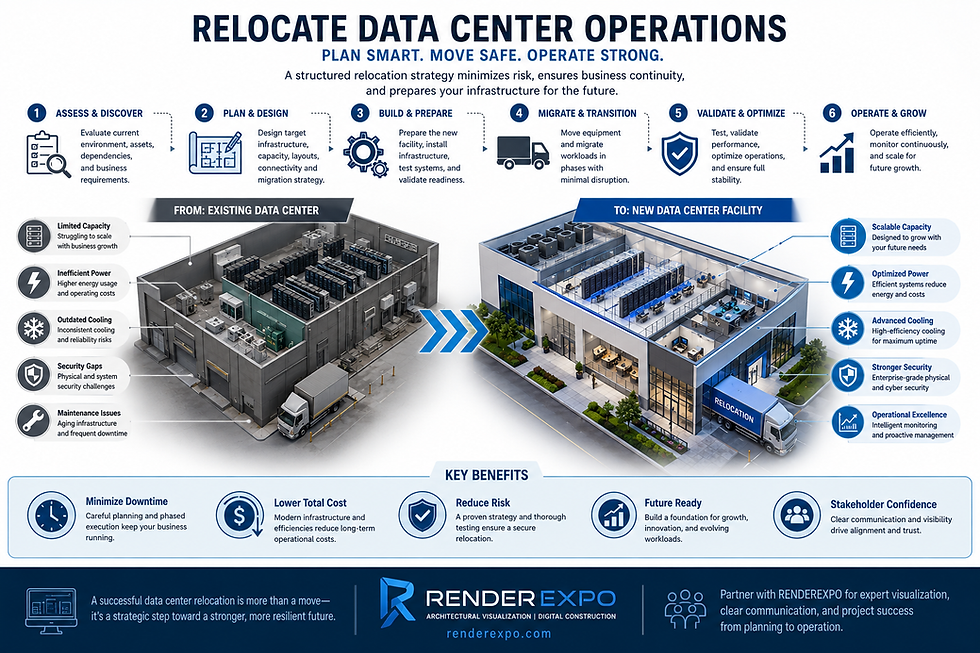
What Does It Mean to Relocate Data Center Operations?
To relocate data center operations means moving physical infrastructure, digital workloads, or both from one data center environment to another. This may involve transferring servers, storage systems, network equipment, security infrastructure, backup systems, monitoring tools, and support operations into a new or upgraded facility.
In some cases, the relocation is physical. Equipment is moved from an older facility into a new building, colocation center, cloud-connected environment, or purpose-built data center. In other cases, the relocation is primarily digital, where workloads and applications are migrated to a new infrastructure platform while physical assets are retired or repurposed.
Most real-world data center relocation projects include both elements. The organization must coordinate facility readiness, equipment inventory, network design, data migration, application dependencies, rack layouts, cable routing, redundancy strategy, security access, and commissioning.
A successful relocation is not measured only by whether equipment arrives at the new site. It is measured by whether the business remains operational, the new environment performs as intended, and every critical stakeholder understands the plan before execution begins.
Why Companies Relocate Data Centers
Organizations relocate data centers for many reasons. Some are driven by business growth, while others are driven by risk, efficiency, modernization, or changing infrastructure needs.
Common reasons include:
Outgrowing an existing facility
Moving to a more reliable or scalable site
Consolidating multiple data rooms or facilities
Reducing operational costs
Improving power and cooling performance
Supporting higher-density computing
Moving closer to cloud, fiber, or energy infrastructure
Replacing outdated equipment or facility systems
Improving physical security and compliance
Preparing for AI, high-performance computing, or larger digital workloads
For real estate developers and data center owners, relocation may also be part of a larger campus strategy. A company may move from a constrained legacy site into a phased hyperscale campus, a colocation facility, or a new purpose-built data center with stronger expansion potential.
In every case, the relocation must be treated as a high-risk project. Decisions made during planning can affect uptime, capital cost, construction coordination, operational reliability, and future scalability.
How to Relocate Data Center Infrastructure: Key Planning Stages
A data center relocation should be structured in clear stages. Each stage should reduce uncertainty and prepare the project team for controlled execution.
1. Existing Facility Assessment
The process begins with a complete understanding of the current data center environment. This includes physical assets, IT systems, applications, network connections, power usage, rack layouts, cooling requirements, security controls, and operational dependencies.
The assessment should identify what will be moved, what will be replaced, what will be retired, and what should remain operational during the transition. This is also the right time to document current pain points, such as poor airflow, limited redundancy, outdated cabling, insufficient space, or inefficient maintenance access.
2. Inventory and Dependency Mapping
A data center relocation cannot rely on assumptions. Every server, cabinet, network path, storage device, software dependency, and business-critical application should be documented.
Dependency mapping is especially important because many systems rely on one another in ways that are not immediately visible. An application may depend on a database, storage array, firewall, authentication system, backup process, or third-party connection. If these dependencies are not understood, the relocation can create avoidable failures.
3. New Site Readiness
Before any equipment is moved, the new facility must be ready. This includes power distribution, backup power, cooling systems, fire protection, access control, network connectivity, rack layouts, loading areas, security zones, staging areas, and commissioning procedures.
For new construction or major upgrades, coordination between architects, engineers, contractors, data center operators, and IT teams is critical. The physical environment must support the technical strategy.
This is where architectural visualization, construction visualization, and digital coordination can become valuable. Stakeholders need to understand not only what the new data center will look like, but also how equipment, circulation, maintenance access, utility areas, security boundaries, and future phases will function.
4. Migration Strategy and Phasing
The relocation plan should define whether the move will happen in one major cutover, multiple phases, parallel operations, or a hybrid approach.
For many organizations, phased relocation is safer than a single move. Critical systems can be migrated in groups, tested, validated, and monitored before the next stage begins. This reduces risk and gives the team time to correct issues before they affect the full environment.
Phasing should account for:
Business-critical applications
Maintenance windows
Network cutover requirements
Data backup and rollback plans
Equipment transport logistics
Staff responsibilities
Vendor coordination
Temporary redundancy
Testing and validation
5. Risk Management and Business Continuity
Every data center relocation should include a risk management plan. The project team should identify what could go wrong and how each issue will be addressed.
Risks may include downtime, damaged equipment, insufficient cooling, network misconfiguration, delayed construction, missing documentation, access problems, failed backups, security gaps, or unclear communication between teams.
A strong business continuity plan defines backup procedures, fallback options, communication protocols, escalation contacts, and decision-making authority. The goal is not to assume that everything will go perfectly. The goal is to be prepared when something does not.
The Role of Visualization When You Relocate Data Center Facilities
When teams relocate data center facilities, technical documentation alone is often not enough. Drawings, spreadsheets, rack diagrams, and schedules are essential, but many stakeholders still need clear visual communication to understand what is being proposed.
Professional visualization can help translate complex infrastructure decisions into clear, reviewable material.
Site and Campus Visualization
If the relocation involves a new data center building or campus, exterior renderings, aerial renderings, and site visuals can help communicate access, building orientation, utility zones, security fencing, generator yards, substation relationships, equipment yards, roadways, truck circulation, and future expansion areas.
These visuals can support internal decision-making, investor presentations, entitlement discussions, community review, and executive approvals.
Interior and Technical Space Visualization
Interior visualization can help teams understand rack layouts, equipment rooms, corridors, security checkpoints, control rooms, office integration, staging areas, and maintenance circulation.
For technical spaces, clarity matters. The goal is not decoration. The goal is communication. A well-developed visual can help a non-technical stakeholder understand why space, clearance, routing, cooling, and access decisions matter.
Construction Visualization
Construction visualization can support phasing, sequencing, temporary conditions, equipment installation, logistics, and coordination between disciplines. This is especially useful when the relocation depends on new construction, tenant improvement, infrastructure upgrades, or phased occupancy.
A visual phasing plan can help executives, contractors, IT teams, and operators understand what happens first, what remains active, and what must be completed before the next step.
Digital Twins and Operational Communication
For larger or more complex data center environments, digital twins can support ongoing coordination by creating a more intelligent visual reference for the facility. A digital twin can help teams understand spatial relationships, equipment locations, maintenance access, and future planning scenarios.
While a digital twin is not a substitute for engineering, operations, or commissioning, it can become a valuable communication layer for planning and facility management.
Common Mistakes During Data Center Relocation
Even experienced organizations can underestimate the complexity of relocation. Some of the most common mistakes include:
Starting the move before the new site is fully ready
Failing to document dependencies between systems
Underestimating downtime risk
Ignoring physical logistics and access constraints
Overlooking cooling and power requirements
Not planning for rollback scenarios
Relying on outdated drawings or incomplete records
Failing to communicate clearly with executives and stakeholders
Treating the project as only an IT move instead of a facility, construction, and operations project
Many relocation problems come from poor coordination rather than lack of technical skill. A strong relocation plan should align everyone around the same scope, schedule, risks, and desired outcome.
Data Center Relocation and Stakeholder Communication
A data center relocation usually involves many decision-makers: IT leadership, facilities teams, executives, investors, architects, engineers, contractors, operators, security consultants, vendors, and sometimes public authorities.
Each group has different priorities. IT teams may focus on uptime and application dependencies. Facilities teams may focus on power, cooling, access, and maintenance. Executives may focus on cost, risk, schedule, and business continuity. Developers and investors may focus on future capacity, market positioning, and long-term asset value.
Clear visual communication helps bridge those gaps. Aerial renderings, 3D site plans, phasing diagrams, animations, digital twins, and presentation visuals can make complex relocation strategies easier to review and approve.
For data center developers and project owners, this is especially important. A relocation plan may need to support capital approval, tenant coordination, investor confidence, construction sequencing, or municipal review. The better the project is communicated, the easier it becomes to align stakeholders before costly decisions are made.
How RENDEREXPO Supports Data Center Relocation Planning
RENDEREXPO supports data center teams by creating professional visualization and digital construction materials that help clarify complex projects before they move into execution.
For data center relocation, RENDEREXPO can assist with:
Data center exterior renderings
Aerial renderings for campus and site communication
Interior visualization for technical and support spaces
3D floor plans and layout communication
Construction visualization and phasing diagrams
Animation and walkthroughs for stakeholder presentations
Digital twin strategies for facility communication
Investor and executive presentation visuals
Permit, entitlement, and approval support visuals
Real estate and infrastructure marketing materials
RENDEREXPO’s value is not limited to producing attractive images. The company helps translate architectural, construction, and technical information into clear visual communication that decision-makers can understand.
For data center relocation projects, that clarity can help reduce confusion, support better planning, and improve alignment between technical teams and business stakeholders.
When Should Visualization Start in a Data Center Relocation?
Visualization should begin early enough to influence decisions, not after all major decisions have already been made.
The best time to involve a visualization partner is during planning, site evaluation, schematic design, stakeholder presentations, or early construction coordination. At that stage, visual materials can help teams compare options, communicate risk, understand phasing, and align around a preferred strategy.
Waiting until the end limits the value. By then, visualization becomes a marketing deliverable instead of a planning tool. For data center relocation projects, the strongest value often comes when visuals are used to support coordination, approvals, and decision-making before execution begins.
FAQ Section
What is the best way to relocate data center operations?
The best way to relocate data center operations is to start with a complete assessment, document all assets and dependencies, confirm new site readiness, create a phased migration plan, test the process, and maintain a clear rollback strategy. The relocation should involve IT, facilities, construction, operations, security, and executive stakeholders.
How long does it take to relocate a data center?
The timeline depends on the size of the facility, equipment quantity, application complexity, site readiness, network requirements, and risk tolerance. A small relocation may take weeks of planning and execution, while a larger enterprise or colocation move can require several months or more.
What are the biggest risks when relocating a data center?
The biggest risks include downtime, data loss, equipment damage, network failure, incomplete dependency mapping, delayed facility readiness, cooling or power issues, security gaps, and poor coordination between teams.
Should a data center relocation be phased?
In many cases, a phased relocation is safer than a single cutover. Phasing allows teams to migrate systems in controlled groups, test performance, validate dependencies, and reduce the impact of unexpected problems.
How can visualization help with data center relocation?
Visualization helps teams understand site layouts, equipment areas, access routes, phasing, construction sequencing, future expansion, and stakeholder presentations. It makes complex technical and facility information easier to communicate and review.
What visuals are useful for a data center relocation project?
Useful visuals include aerial renderings, site plans, exterior renderings, interior technical space visuals, 3D floor plans, construction phasing diagrams, animations, walkthroughs, and digital twin models.
Who should be involved in a data center relocation plan?
A relocation plan should involve IT leadership, facilities teams, data center operators, architects, engineers, contractors, security consultants, equipment vendors, network providers, executive leadership, and any stakeholders responsible for approvals or business continuity.

Conclusion
To relocate data center operations successfully, organizations need a strategy that connects technology, facility readiness, construction coordination, risk management, and stakeholder communication. The process is too important to rely on assumptions, incomplete documentation, or unclear presentations.
A strong relocation plan should define what is moving, how it will move, when each phase will happen, what risks must be controlled, and how decision-makers will understand the project before execution begins.
RENDEREXPO helps data center developers, owners, architects, contractors, and project teams communicate complex relocation and infrastructure projects through architectural renderings, aerial views, animations, 3D floor plans, construction visualization, digital twins, and executive presentation visuals.
If your team is planning to relocate data center facilities or communicate a new data center site, RENDEREXPO can support the visual strategy, stakeholder alignment, and project communication needed to move forward with clarity.


Comments